User Story Pack:用户故事的自动化
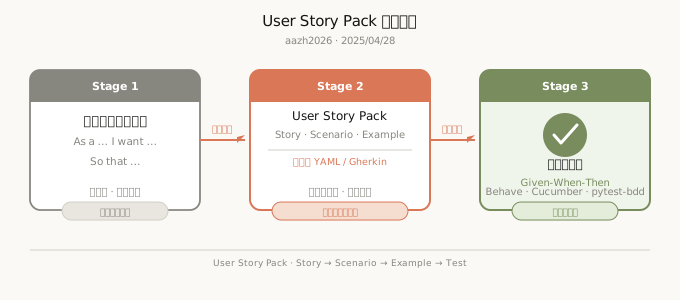
「2024年,一位敏捷教练崩溃地说:’我们的用户故事写得很标准——As a… I want… So that…,但开发出来的功能总是和需求有偏差。’问题不在于格式,而在于用户故事是’给人读的’,而不是’给机器执行的’。在AI时代,用户故事需要从自然语言描述进化为可自动验证的规格说明。」
TL;DR
本文核心观点:
- 核心概念 — User Story Pack 用 Story/Scenario/Example 三层结构,将自然语言需求转化为机器可解析的结构化规格
- 关键机制 — Given-When-Then 格式的 Scenario 层直接映射为 Gherkin 格式,验收标准即自动化测试代码
- 实际效果 — 业界观察反复印证:结构化需求规格可显著降低需求理解偏差、压缩测试编写时间、减少 Bug 逃逸到生产(具体百分比因团队和项目而异,非统一基准)
- 延伸洞察 — 关键不是”更快的自动化”,而是人从执行链里被替换出来——你设计系统,系统替你跑腿
传统用户故事的困境
经典用户故事格式
敏捷开发中,用户故事的标准格式是:
粒度模糊
问题:”查看订单历史”包含多少功能?
结果:产品经理、工程师、测试对”完成”的定义不一致。
验收标准缺失
传统用户故事往往附带这样的验收标准:
问题:
- “可以查看”怎么验证?
- 每页显示多少条?
- 加载时间要求?
- 错误场景呢?
无法自动验证
用户故事是自然语言,人类能理解,但机器无法直接验证。
与测试脱节
传统流程: 根本问题:用户故事和测试用例是两个独立的工件,没有自动关联。
什么是 User Story Pack
定义
User Story Pack(用户故事包):围绕一个用户目标组织的、结构化的、可自动验证的需求集合,包含用户故事、场景定义、验收标准、示例数据和预期行为。
不是”一个用户故事”,而是”一个完整功能的所有相关用户故事的集合”。
User Story Pack vs 传统用户故事
| 维度 | 传统用户故事 | User Story Pack |
|---|---|---|
| 组织方式 | 独立卡片 | 层次化包结构 |
| 粒度 | 单一故事 | Story + Scenarios + Examples |
| 验证方式 | 人工验证 | 自动化验证 |
| 格式 | 自然语言 | 结构化(YAML/Gherkin) |
| 与测试关系 | 分离 | 一体(验收即测试) |
| AI 可读性 | 需人工解释 | 直接可解析 |
核心原则
原则 1:故事是包的入口
原则 2:场景是故事的展开
一个用户故事可能对应多个场景:
- 正常场景
- 边界场景
- 错误场景
- 替代流程
原则 3:示例是可执行的规格
每个场景包含具体的 Given-When-Then,可直接转化为测试代码。
💡 Key Insight
每个场景包含具体的 Given-When-Then,可直接转化为测试代码
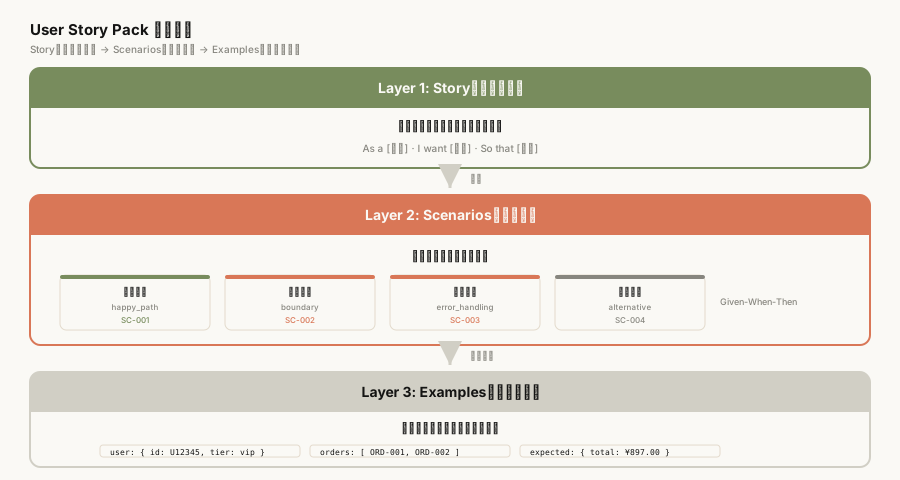
三层结构:Story → Scenario → Example
层次结构概览
Story 层:用户故事的入口
敏捷开发中,用户故事的标准格式是 As a [role]、I want [feature]、So that [value]——角色、功能、价值三个要素缺一不可。这个格式最早在 1998 年由 Mike Cohn 提出,核心目的是作为沟通工具,而不是机器可执行的规格说明。
以电商场景为例,一个标准的用户故事:
As a 购物用户,I want 查看订单历史,So that 我可以追踪近期购买记录
这个格式的优势在于简洁、可对话,产品经理、开发、测试三方能在同一张卡片上达成初步共识。但它的局限性也很明显:当开发真正去实现”查看订单历史”这个功能时,会遇到大量未回答的问题——每页显示多少条?排序规则是什么?错误情况如何处理?”追踪近期购买记录”中的”近期”是多久?
这些问题在 As a / I want / So that 格式里找不到答案。产品经理会说”这些是实现细节,开发自己判断”;开发会说”我不知道产品想要什么,我先按我的理解做”;测试会说”我不知道验收标准,我先按开发给我的结果测”。三个人对”完成”的定义完全不一样。
这就是经典用户故事格式的根本矛盾:它是给人读的好格式,但不是给机器执行的规格说明。
Story 层:格式
User Story Pack 的 Story 层继承了 As a / I want / So that 的语义结构,但将其放入 YAML 格式,明确每个字段的含义:
story:
  role: 购物用户
  feature: 使用优惠券
  goal: 获得折扣
  value: 降低购物成本
role 定义谁有这个需求;feature 定义要做什么;goal 定义用户想达成的具体目标;value 定义这个目标背后的业务价值。四个字段缺一不可——相比自然语言描述,结构化格式让 AI 能够直接解析每个字段的语义,不需要人工推断。
Scenarios 层:场景的展开
一个用户目标(Story)可能对应多条不同的交互路径。以”使用优惠券”为例:
- 正常流程:优惠券满足条件,正常扣减
- 边界场景:优惠券金额恰好等于订单金额、优惠券刚过有效期
- 错误场景:优惠券已被使用、优惠券与满减活动不可叠加
- 替代路径:用户取消订单后重新下单,优惠券状态如何恢复
这就是 Scenarios 层的作用:穷尽所有可能的交互路径。每个 Scenario 用 Given-When-Then 结构描述:
Scenario: 正常使用优惠券
  Given 用户持有有效优惠券(满100减20)
  And 购物车内商品总金额为 150 元
  When 用户提交订单并应用优惠券
  Then 订单金额应为 130 元
Given 描述初始状态;When 描述用户行为;Then 描述预期结果。三个部分缺一不可,且每一步都必须足够具体——”优惠券有效”是什么状态?”提交订单”是哪种提交方式?具体化到有数据,才能转化为自动化测试。
Examples 层:示例数据
Scenario 描述了交互路径,但”150 元”具体是多少?优惠券码是什么?用户 ID 是什么?Examples 层就是用来填充这些具体测试数据的:
examples:
  - user_id: U001
    coupon_code: SAVE20
    cart_total: 150
    coupon_min_spend: 100
    expected_order_total: 130
  - user_id: U002
    coupon_code: SAVE20
    cart_total: 80
    coupon_min_spend: 100
    expected_order_total: 80
    expected_message: 优惠券不满足使用条件
示例数据是消除歧义的最后一道关卡。即使 Given-When-Then 描述得再清楚,如果没有具体的测试数据,机器仍然无法执行自动化测试。有了 Examples 层,User Story Pack 就变成了可以直接转化为测试代码的完整规格说明。
从用户故事到自动化测试
验收标准即测试
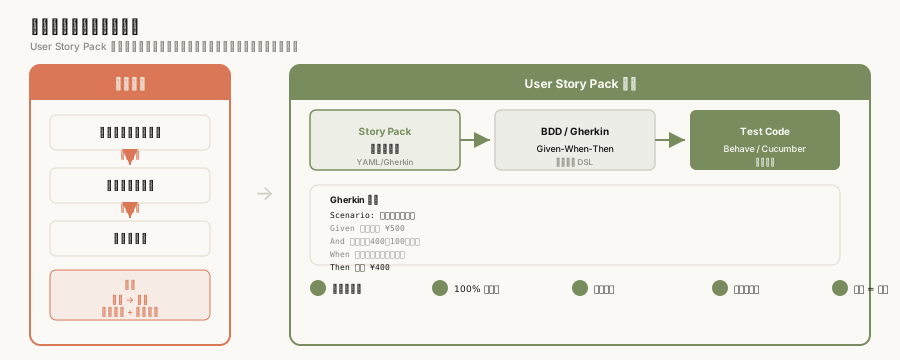
User Story Pack 的核心价值:验收标准可以直接转化为自动化测试。
💡 Key Insight
User Story Pack 的核心价值:验收标准可以直接转化为自动化测试
Gherkin 格式的优势
Gherkin 是一种业务可读的 DSL(领域特定语言),是 BDD(行为驱动开发)的标准格式,也是 User Story Pack 与自动化测试之间的桥梁。
Gherkin 的核心优势在于它的双重可读性:对业务人员,它是自然语言风格的规格说明;对机器,它是结构化可解析的输入格式。Given-When-Then 语法用最少的词汇覆盖了场景描述的所有要素:
- Given:初始状态(系统处于什么状态)
- When:触发动作(用户做什么)
- Then:预期结果(系统应该如何响应)
这种格式 AI 可解析,业务可读。AI 能够直接理解 Given-When-Then 的语义并生成对应的测试代码,不需要额外的翻译层。
自动生成测试代码
从 Gherkin 规格到自动化测试代码的转换,由 Cucumber/Behave 框架完成:
输入:Gherkin 格式的 Scenario 文件(.feature) 处理:Behave(Cucumber 的 Python 实现)解析 Given-When-Then,匹配 Step Definitions 输出:可直接运行的测试代码
# 运行 User Story Pack 生成的测试
behave features/coupon_usage.feature
这种pipeline的优势在于规格说明和测试代码是同一份文档。传统开发中,需求文档(用户故事)和测试代码是两个独立维护的工件,内容容易漂移;User Story Pack 模式下,Gherkin 文档既是需求规格,也是测试代码的蓝图——改一处,全链路生效。
关键工具链:behave(Python)、pytest-bdd(Python)、Cucumber(多语言支持)
测试覆盖矩阵
User Story Pack 的场景化结构自动生成了测试覆盖矩阵:行是 Scenario(正常流程、边界场景、错误场景),列是测试维度(功能覆盖、边界值、错误处理)。
覆盖矩阵的每个单元格对应一个具体的 Given-When-Then-Example 组合。当产品经理增加一个新 Scenario,矩阵自动扩展;当某个 Example 数据变更,相关的测试用例同步更新。
这种矩阵的价值在于可视化覆盖盲区:如果某个测试维度在矩阵中没有对应的 Scenario,就意味着该场景未被覆盖。AI 可以基于场景描述自动识别这些盲区并提示补全。
AI 自动生成与验证
AI 如何帮助编写 User Story Pack
从 PRD 自动生成
AI 从 PRD 文档自动生成 User Story Pack 的完整结构,是 AI 在需求工程中最直接的价值体现。传统的 PRD 是自然语言文档,产品经理写完后,开发需要自己去理解哪些功能点需要实现、测试需要覆盖哪些场景——这个转换过程是手动且容易出错的。
AI 的做法是:把 PRD 作为 LLM 的上下文输入,给定特定的 prompt 框架,让模型提取 Story/Scenario/Example 三层结构。一个典型的 prompt 设计:
“请从以下 PRD 文档中提取所有用户故事。对于每个用户故事,请输出:1) Story 层(role/feature/goal/value);2) Scenarios 层(Given-When-Then 格式,覆盖正常流程和主要异常场景);3) Examples 层(为每个 scenario 提供具体测试数据)”
这种 AI 可读性是 User Story Pack 相比传统用户故事的核心优势:格式足够结构化,AI 能直接解析,不需要人工解读。
补全缺失的场景
AI 可以分析现有场景,识别遗漏的边界情况:
即使产品经理已经写出了 5 个场景,AI 仍然可以分析这些场景,发现潜在的覆盖盲区。例如对于”使用优惠券”功能,人类可能容易遗漏以下边界情况:
- 并发场景:用户在同一毫秒内使用同一张优惠券
- 叠加规则:优惠券与满减、折扣码同时生效时的优先级
- 过期时刻:优惠券在订单支付完成的瞬间过期
- 状态恢复:订单取消后,锁定优惠券的释放逻辑
AI 基于场景描述的语义分析,能够识别出这些人类容易忽视的边界条件,并生成对应的 Scenario。这是 AI 补全的核心价值:不是替代人类思考,而是扩展人类思维的边界。
生成示例数据
AI 根据场景自动生成合理的测试数据:
给定一个 Scenario(”用户使用有效优惠券”),AI 能够自动生成符合业务上下文的测试数据:有效的用户 ID、合理的订单金额、在有效期内的优惠券代码、符合优惠券使用条件的购物车内容。
AI 生成测试数据的优势不仅在于速度,更在于一致性:AI 生成的测试数据在多个 Scenario 之间保持一致的用户 ID 格式、金额范围、日期格式,不需要人工去维护一套测试数据规范。这在有数十个 Scenario 的大型功能包里尤为重要。
完整性检查
AI 可以系统性检查 User Story Pack 的完整性:Story 层的每个 goal 是否都被对应的 Scenario 覆盖?Scenario 层的每个 Given-When-Then 步骤是否都有对应的 Example 数据?场景集是否穷尽了所有可能的交互路径?
穷尽交互路径是完整性检查的核心目标。一个”使用优惠券”的 Story,如果只有”正常使用”一个 Scenario,那就是不完整的——优惠券过期、优惠券不满足条件、优惠券已被使用,都是真实用户会遇到的场景,必须被覆盖。
AI 的完整性检查能够自动列出缺失的场景,并给出建议的 Scenario 描述,供产品经理确认或修改。
一致性检查
AI 可以检查 Story、Scenario、Example 三层之间的一致性:Scenario 的描述是否真的在实现 Story 的 goal?Example 数据是否与 Scenario 的 Given-When-Then 步骤匹配?不同 Scenario 之间的用户 ID、优惠券代码是否保持一致?
例如,如果 Scenario 描述里 Given 设置了”优惠券满 100 减 20”,但 Example 数据里的 cart_total 是 80——这就是一个明显的不一致,AI 能够自动发现。
可测试性检查
AI 可以检查 Given-When-Then 步骤是否足够具体到可以被自动化测试执行。”用户登录”是一个模糊的 Given——是哪种登录方式?用户名密码?手机验证码?OAuth?”订单金额较大”也是一个模糊的 Then——多少算大?AI 能够识别这些模糊表述,并提示将其量化为具体的测试数据或操作步骤。
可测试性是 User Story Pack 的最终目标:不能被自动化测试执行的规格说明,不是真正的规格说明。
实战:电商系统的用户故事包
功能:优惠券使用
以电商系统的”优惠券使用”功能为例,对比传统用户故事与 User Story Pack 的差异。
传统用户故事
As a 购物用户,I want 使用优惠券,So that 我可以获得折扣
这是标准的用户故事格式,简洁明了。产品经理看到这张卡,知道”优惠券”是一个功能点;开发看到这张卡,知道要做优惠券的核销逻辑。但”优惠券怎么用?哪些优惠券可以用?优惠券不能和什么一起用?过期了怎么办?”——这些在用户故事里找不到答案。
这就是传统用户故事的典型状态:有格式,无内容。卡片写得很标准,但实际开发时,产品、开发、测试三方对功能的理解很可能完全不同。
User Story Pack
User Story Pack 对同一功能进行了完整的结构化描述:
Story 层:
story:
  role: 购物用户
  feature: 使用优惠券
  goal: 订单结算时应用优惠券抵扣金额
  value: 提升转化率与客单价
Scenarios 层(4 个场景,覆盖主要交互路径):
Scenario: 正常使用优惠券
  Given 用户持有有效优惠券(满100减20)
  And 购物车内商品总金额为 150 元
  When 用户提交订单并应用优惠券
  Then 订单金额应为 130 元

Scenario: 券不满足使用条件
  Given 用户持有有效优惠券(满100减20)
  And 购物车内商品总金额为 80 元
  When 用户提交订单并应用优惠券
  Then 显示"优惠券不满足使用条件"
  And 订单金额保持 80 元

Scenario: 券已过期
  Given 用户持有已过期优惠券(满100减20)
  When 用户提交订单并应用优惠券
  Then 显示"优惠券已过期"
  And 订单金额不含优惠券抵扣

Scenario: 券与满减叠加
  Given 用户持有有效优惠券(满100减20)
  And 购物车参与满减活动(满200减50)
  And 购物车内商品总金额为 250 元
  When 用户提交订单并应用优惠券
  Then 系统提示"优惠券与满减活动不可叠加"
  And 订单金额为 200 元(满减后)
Examples 层(每个 Scenario 的具体测试数据):
examples:
  - scenario: 正常使用优惠券
    user_id: U001
    coupon_code: SAVE20
    cart_total: 150
    coupon_min_spend: 100
    coupon_discount: 20
    expected_order_total: 130

  - scenario: 券不满足使用条件
    user_id: U002
    coupon_code: SAVE20
    cart_total: 80
    coupon_min_spend: 100
    expected_order_total: 80
    expected_message: 优惠券不满足使用条件

  - scenario: 券已过期
    user_id: U003
    coupon_code: SAVE20
    coupon_expired_at: 2025-01-01T00:00:00Z
    cart_total: 150
    expected_order_total: 150
    expected_message: 优惠券已过期

  - scenario: 券与满减叠加
    user_id: U004
    coupon_code: SAVE20
    cart_total: 250
    coupon_min_spend: 100
    promotion_type: full_reduction
    promotion_discount: 50
    expected_order_total: 200
    expected_message: 优惠券与满减活动不可叠加
这就是传统用户故事与 User Story Pack 的核心差距:同一张卡片,背后是一套完整的结构化规格,而不是一句轻飘飘的”As a… I want…”。
自动生成的测试
从上述 User Story Pack,直接生成 Behave/Gherkin 格式的自动化测试代码:
Step Definitions(Python/behave):
from behave import given, when, then

@given('用户持有有效优惠券(满100减20)')
def step_coupon_valid(context):
    context.coupon = Coupon(code='SAVE20', min_spend=100, discount=20, status='active')

@when('用户提交订单并应用优惠券')
def step_apply_coupon(context):
    context.order = Order(cart_total=context.cart_total)
    context.order.apply_coupon(context.coupon)

@then('订单金额应为 {expected} 元')
def step_check_total(context, expected):
    assert context.order.total == int(expected)
Feature File(自动生成):
Feature: 优惠券使用
  Scenario: 正常使用优惠券
    Given 用户持有有效优惠券(满100减20)
    And 购物车内商品总金额为 150 元
    When 用户提交订单并应用优惠券
    Then 订单金额应为 130 元
从 User Story Pack 到自动化测试代码,中间不需要人工翻译——Scenario 层直接映射为 Gherkin 格式,Example 层直接映射为 Step Definition 的具体参数。
写在最后:从故事到契约
范式转移
传统用户故事:
- 是沟通工具,促进产品、开发、测试之间的对话
- 是轻量级的,避免过度文档化
- 依赖口头沟通补充细节
User Story Pack:
- 是契约,定义系统行为的精确规格
- 是可执行的,直接驱动自动化测试
- 包含完整上下文,减少沟通成本
什么时候用 User Story Pack?
适合场景:
- 核心业务功能(订单、支付、库存)
- 复杂业务规则(优惠券、积分、会员)
- 需要高可靠性的功能(金融、安全)
- AI 生成代码的场景
不适合场景:
- 简单的 CRUD 功能
- 探索性原型
- 内部工具
迁移路径
阶段 1:并行使用
- 保持传统用户故事格式
- 对关键功能补充 User Story Pack
阶段 2:工具化
- 使用工具自动生成 User Story Pack
- 从 PRD 自动提取场景
阶段 3:全面采用
- 所有 P0/P1 功能使用 User Story Pack
- 自动生成测试和文档
核心收益
| 收益 | 业界观察方向(示意区间,非统一基准) |
|---|---|
| 需求理解偏差 | 显著降低 |
| 测试编写时间 | 显著缩短 |
| Bug 逃逸到生产 | 明显减少 |
| 需求变更响应速度 | 显著提升 |
💡 Key Insight
User Story Pack 的核心收益(业界观察方向,具体数字因团队和项目而异):需求理解偏差显著降低,测试编写时间显著缩短,Bug 逃逸到生产明显减少。可参考 BDD 与 Gherkin 实践资料:Cucumber 官方文档 与 Behave 教程。
结尾
User Story Pack 的本质,是将用户故事从”给人读的”文档进化为”给机器执行的”规格说明。这个转变在 AI 时代变得格外重要:当 AI 能够直接解析结构化需求并生成测试代码时,人在执行链里的角色就从”翻译者”变成了”设计者”。
关键不是”更快的自动化”,而是人从执行链里被替换出来。你设计系统,系统替你跑腿。
💡 Key Insight
关键不是”更快的自动化”,而是人从执行链里被替换出来。你设计系统,系统替你跑腿。
AI-Native SDLC 交付件体系 #04 深度阅读时间:约 20 分钟
💬 评论
💡 使用 GitHub 账号登录 即可参与讨论